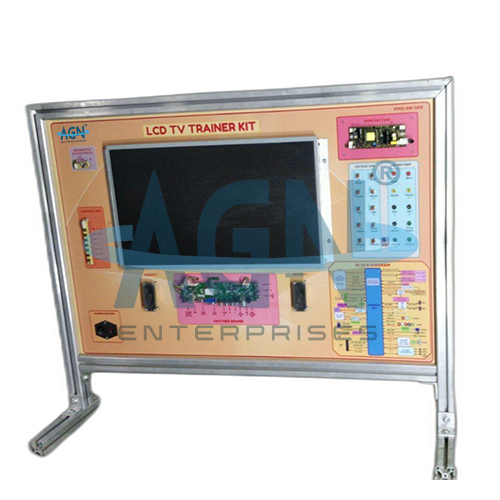
The LCD TV Trainer from AGN Enterprises is an educational consumer-electronics training system designed to provide practical understanding of the working principles, functional blocks, electronic circuits, signal paths, display system, power supply, audio section, and troubleshooting techniques of an LCD television.
The trainer presents important television sections in an accessible educational format so students can relate theoretical circuit concepts to the operation of a practical LCD TV. Clearly identified circuit sections, test points, controls, and signal paths make it suitable for demonstrations as well as hands-on laboratory exercises.
Students can use the trainer to study LCD display technology, backlighting, video and audio processing, power management, input interfaces, system control, signal tracing, and basic fault diagnosis.
The apparatus is suitable for electronics laboratories, consumer-electronics courses, television servicing institutes, ITIs, polytechnics, engineering colleges, universities, vocational institutes, and technical training centers.
The primary aim is:
To study the functional blocks, working principles, signal paths, and servicing concepts of an LCD television.
Students can also study:
LCD Display Technology
Backlight System
Power Supply Section
Main Board
Video Processing
Audio Processing
Input and Output Sections
Remote-Control Operation
Signal Tracing
Troubleshooting
An LCD TV (Liquid Crystal Display Television) uses a liquid-crystal panel to control the light that forms the visible image.
Liquid crystals do not normally generate the illumination themselves. Instead, a separate backlight provides light, while the LCD panel controls the amount of light passing through individual pixels.
Therefore, an LCD television combines the display panel with several electronic subsystems responsible for signal processing, power conversion, control, audio output, and backlight operation.
An LCD television receives audio and video information from a selected input source.
First, the input section accepts the signal. Next, electronic processing circuits decode and process the video and audio information.
The video information passes toward the display-driving circuitry, while the audio information reaches the audio amplifier and speaker system.
The basic functional sequence can be represented as:
Input → Signal Processing → Video/Audio Processing → Display & Sound Output
Meanwhile, the power-supply section provides the regulated voltages required by the different electronic circuits.
The LCD panel contains a matrix of pixels controlled electronically to produce the required image.
Each pixel regulates the passage of light according to the video information supplied by the display electronics.
Students can therefore study the relationship between:
Pixels
Liquid Crystals
Display Driving
Backlighting
Video Information
Image Formation
This provides a practical introduction to flat-panel display technology.
An LCD panel requires a suitable backlight source to make the displayed image visible.
Depending on the television design, the backlighting technology may use fluorescent lamps or LEDs. Therefore, students should identify the actual backlight technology used in the supplied trainer rather than assuming that every LCD TV uses the same system.
The trainer helps students understand the difference between image generation by the LCD layer and illumination by the backlight.
The power-supply section converts the available electrical supply into the regulated voltages required by the television circuits.
Students can study general functions involving:
Rectification
Filtering
Voltage Conversion
Voltage Regulation
Power Distribution
Protection
This section provides a practical connection between power-electronics theory and consumer-electronics applications.
The main board coordinates many of the television’s important functions.
Depending on the design, it can handle input selection, video processing, audio processing, user commands, system control, and communication with the display electronics.
Therefore, studying the main board helps students understand how several electronic subsystems work together inside an LCD television.
The video-processing section prepares incoming picture information for display.
Students can trace the general signal path from an input source through the processing electronics toward the LCD panel.
This section introduces concepts such as:
Video Input
Signal Selection
Video Processing
Display Formatting
Panel Interface
Picture Output
The television’s audio section processes the sound information associated with the selected source.
The general signal path can be represented as:
Audio Input → Audio Processing → Amplification → Speaker Output
Students can study how an incoming audio signal reaches the final sound-output stage and understand the function of the associated amplification circuitry.
LCD televisions can receive signals from various external sources.
Depending on the supplied trainer, available interfaces may allow students to study the relationship between external audio-video equipment and the television’s internal processing circuitry.
The exact connectors and supported signal formats depend on the trainer configuration.
A remote-control system allows users to operate television functions from a distance.
The remote transmits coded commands, while the television receives and interprets those commands.
Students can therefore study the basic relationship between:
Remote Transmitter
Remote Receiver
Control Processor
User Commands
Television Functions
An educational LCD TV Trainer can provide accessible test points for practical measurements.
Students can use compatible laboratory instruments at designated points to investigate signals and operating conditions.
Suitable instruments may include:
Digital Multimeter
Oscilloscope
Signal Generator
Other Compatible Test Instruments
Students should use only the test points and measurement limits specified for the supplied trainer.
Signal tracing provides a systematic method for understanding and troubleshooting electronic equipment.
Students begin at a known input or functional section and follow the signal through successive stages.
If the expected signal disappears or changes abnormally at a particular stage, students can narrow the investigation to that section.
Therefore, the trainer develops logical diagnostic skills rather than encouraging random component replacement.
Where the supplied trainer includes fault-simulation facilities, instructors can introduce selected circuit conditions for troubleshooting exercises.
Students may investigate symptoms associated with areas such as:
The exact fault facilities depend on the supplied model.
The terms LCD TV and LED TV are closely related.
Both commonly use a liquid-crystal display panel. The main distinction is that the term LED TV generally refers to an LCD television that specifically uses LED backlighting.
Older or other LCD television designs may use different backlight technologies.
This distinction helps students understand the evolution of flat-panel television technology.
Depending on the supplied configuration, students can perform or demonstrate experiments involving:
The exact experimental facilities depend on the supplied trainer.
Students can use the LCD TV Trainer to:
The LCD TV Trainer combines several areas of electronics in one practical system, including:
Analog Electronics
Digital Electronics
Power Electronics
Audio Electronics
Video Electronics
Display Technology
Electronic Measurement
Troubleshooting
Consequently, the trainer provides a useful multidisciplinary learning platform.
The trainer is particularly useful for television servicing and consumer-electronics training.
Students can learn to divide an LCD television into individual functional blocks before diagnosing problems.
Furthermore, accessible test points and educational circuit arrangements help students understand signal paths that are difficult to study on a completely enclosed consumer television.
The LCD TV Trainer can support courses in:
Consumer Electronics
Television Technology
LCD TV Servicing
Electronic Equipment Maintenance
Fault Finding
Audio-Video Electronics
Technical Repair Training
Therefore, it is suitable for both theoretical instruction and practical skill development.
Depending on the model, an LCD TV training system may include:
Exact screen size, panel technology, backlight type, interfaces, test points, fault-simulation facilities, power requirements, and accessories may vary according to the supplied configuration.
LCD television equipment can contain mains-powered and other potentially hazardous electrical sections.
Students should therefore use only the designated educational terminals and test points. They should never touch exposed mains circuitry while the equipment is energized.
Users should also follow the supplied laboratory procedure when making or changing connections. Protected high-voltage sections should only be accessed by appropriately trained personnel.
Users should keep the LCD screen, trainer panel, controls, terminals, and test points clean and dry.
They should protect the LCD panel from mechanical pressure, impact, moisture, and excessive heat. Furthermore, students should avoid short circuits and should never apply an unsuitable external voltage to a test point.
After completing practical work, users should switch off the trainer and store it in a clean, dry laboratory environment.
The LCD TV Trainer is suitable for:
AGN Enterprises supplies LCD TV Trainers, LED TV Trainers, Mobile Phone Trainers, Digital Multimeter Trainers, consumer-electronics trainers, communication equipment, and electronics servicing laboratory systems.
Furthermore, our educational trainers support hands-on electronics education, servicing practice, vocational skill development, engineering training, and systematic troubleshooting.